


Native Camera
4.173.00 Reviews
App Specs
- Version
- 1.4.3
- Updated On
- License
- Free
- Downloads
- 100,000+
- Developer
- N8 Media
- Categories
- Photography
- Platform
- Android
Screenshots
 Analysis by AppCompare
Most phone cameras already hide a surprising amount of control behind a simple shutter button. Native Camera is built around opening that door rather than replacing photography with filters or social tools. Developed by N8 Media, this free photography app gives me a more direct way to work with the camera already present on an Android device. Its central appeal is straightforward: instead of treating the phone camera as a sealed automatic appliance, it aims to make the device’s native camera capabilities more accessible.
That distinction matters. I would not choose this app because I wanted a large editing suite, a social feed, or a collection of decorative effects. I would choose it when I wanted to take the photograph with less interference between my decision and the result. The app is listed for Everyone, runs on Android 8.0 and later, and its current version is 1.3.02. Those details make it approachable for a wide range of Android users, although the actual experience will still depend on how much camera hardware the phone exposes.
After spending time with it, my opinion is that Native Camera makes the most sense for people who feel their ordinary camera app is too simplified. It is especially interesting when you want to understand what your phone can do before buying another camera app. The important caveat is that an app cannot magically add hardware. It can provide access to capabilities the phone and operating system make available, but it cannot turn a basic sensor into a professional interchangeable-lens camera.
Giving the phone camera a more direct role
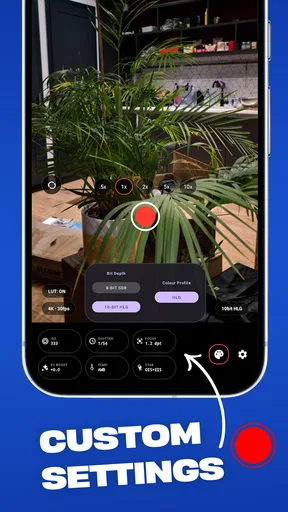
The capability I kept coming back to is access. Native Camera is less about creating a particular visual style and more about putting the camera itself at the center of the workflow. That sounds modest, but it changes how I approach a shot. With a heavily automated camera app, I often take whatever the phone decides is acceptable. With a more direct camera interface, I am encouraged to pause, inspect the scene, and make a deliberate choice before pressing the shutter.
This is useful for situations where automatic processing gets in the way. A phone may brighten a dim scene until it looks flat, sharpen fine textures too aggressively, or balance a bright window and a darker subject in a way that feels unnatural. Native Camera is appealing when I want to work with the phone’s own camera behavior instead of layering a separate visual identity over the image.
I also like the idea of using it as a diagnostic tool. When a phone manufacturer advertises several camera modes, it can be difficult to tell which controls belong to the hardware and which belong to the manufacturer’s camera software. Trying Native Camera gives me another perspective. If the phone exposes a useful capability through this app, I can decide whether a more controlled workflow suits me. If it does not, I learn that the limitation may be tied to the device rather than the app.
That is a more valuable role than the short store description suggests. I see it as a practical bridge between a point-and-shoot habit and a more intentional photography routine. It does not demand that I become a technical photographer overnight. Instead, it makes me pay attention to the relationship between the scene, the phone, and the final image.
Worth Reading Before You Choose

Switching to Android Auto Means Rethinking Your Driving Routine

Google Calendar Makes a Crowded Week Easier to Manage

Baby Panda World Brings Quick Play to Modern Phones, but Its Game Library Feels Busy

ESPN’s Live Game View Makes Following Close Games Easier

QuizzLand Review: A Good Fit for Short Trivia Breaks, Not Every Player

Basketball Stars: Multiplayer Is Fast, but Can It Recover When Matches Go Wrong?
What “native” changes for everyday photography
The word “native” is important here because it points toward the camera system already built into the phone. In everyday use, that means I should think of this app as a control layer, not as a replacement for the sensor, lens, or manufacturer’s image-processing pipeline. The phone remains the limiting factor in low light, zoom quality, focus performance, and overall image detail.
That limitation is not necessarily a weakness. It keeps expectations realistic. If my phone has one useful rear camera and modest hardware, Native Camera will not provide the optical reach of a dedicated telephoto lens. If the phone has more capable hardware, the app may be a sensible way to explore what is available without immediately committing to a more complicated camera application.
In my view, this makes the app more interesting for learning than for showing off. Someone who wants instant, polished images with no decisions to make may prefer the standard camera. Someone who wants to understand why a photo looks too dark, too bright, soft, or overly processed can get more value from a direct camera experience.
How I would use it in practice
The first practical adjustment is to slow down. I would open Native Camera before the moment arrives, rather than trying to launch it after the subject has already moved. This is particularly useful for street scenes, pets, children, and changing light. A direct camera workflow rewards preparation because the benefit comes from making a considered capture, not from applying a correction after the fact.
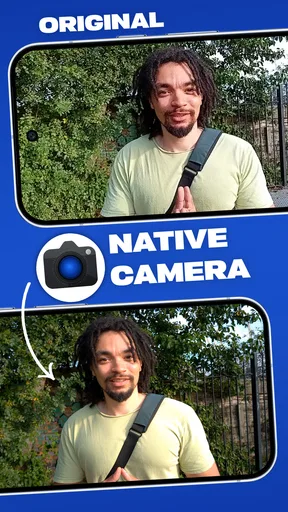
For a quick test, I would photograph the same subject with the phone’s usual camera and then with Native Camera. I would use a scene containing both a bright area and a shadow, such as a person standing near a window or a table lit from one side. Comparing the two images helps reveal whether the app gives me a more useful starting point or simply a different interface. The test should be judged by detail, exposure, color, and ease of use—not just by which image looks brighter on the screen.
A second useful habit is to test the app in several lighting conditions before trusting it for an important photograph. Daylight is forgiving and can make almost any camera workflow feel good. Indoor light, backlighting, and evening scenes reveal much more. I would also check how quickly I can frame and capture a moving subject, because control is not helpful if the interface makes me miss the moment.
One non-obvious trade-off is that greater access can create more decisions without guaranteeing a better picture. If I spend too long adjusting a shot, the subject may move or the light may change. For a casual snapshot, the phone’s default camera may therefore be the smarter choice. Native Camera earns its place when the photograph matters enough for me to accept a little more involvement.
I would also keep the app’s role separate from editing. If I want to crop, remove distractions, create a collage, or prepare an image for social media, a dedicated editor may be better afterward. Native Camera’s value is at the capture stage. Treating it as an all-purpose photography studio would lead to the wrong expectations and could make the workflow feel incomplete.
A realistic daily scenario
Imagine I am photographing a small product for a local listing at home. The object is on a desk, with daylight entering from one side and a bright wall behind it. The default camera may produce a perfectly usable image, but it may also make the wall too prominent, soften the object, or choose an exposure that hides texture. I would use Native Camera to approach the shot more deliberately: place the object carefully, keep the phone steady, compare the framing, and take several versions rather than accepting the first automatic result.
The benefit here is not a promise of professional studio quality. The benefit is control over the process. I can decide whether the object or the background deserves priority, repeat the capture from a slightly different position, and compare the result with what the regular camera produced. For a seller, student, hobbyist, or anyone documenting an item, that extra control can matter more than a collection of filters.
Another good scenario is photographing a document or a whiteboard when the standard camera keeps making one side too dark. I would still check the result carefully for readability, but a camera app focused on direct capture may be preferable to a decorative photography tool. The important point is to keep the phone parallel to the surface and use even light; no camera app can fully rescue glare or a severe angle.
Where the approach works and where it becomes frustrating
The strongest advantage is clarity of purpose. Native Camera does not need to compete with editing apps on their own ground. It is useful before the image exists, when framing, timing, and the phone’s camera behavior determine the starting point. I appreciate that focus because it makes the app easier to evaluate: I can ask whether it helps me capture more intentionally instead of wondering which effect to apply.
The main friction is that camera access varies by Android device. Two phones running the same operating-system minimum may expose very different lenses and controls. A newer phone may offer more hardware options than an older one, while a manufacturer may restrict certain functions to its own camera application. This is why I would test Native Camera on the exact phone I plan to use rather than assuming that a feature visible on another device will behave identically.
There is also a learning curve, even if it is a gentle one. Automatic photography is fast because it hides decisions. A more direct camera app asks me to become responsible for the result. That can be rewarding, but it can also make the first few sessions feel less effortless. I would not recommend it to someone who only wants to point, tap, and share without thinking about the capture process.
The free price makes trying it easy, but the app includes in-app purchases ranging from $9.99 to $49.99 per item. That does not automatically make it poor value, yet it does change how I would approach installation. I would begin with the free experience and decide whether the workflow genuinely improves my photography before paying for anything. A purchase should solve a specific need, not simply reflect curiosity about additional access.
Another limitation is that direct camera access cannot compensate for poor physical technique. Shaky hands, dirty lenses, moving subjects, and harsh light remain real problems. My practical advice is to clean the lens, brace the phone against a stable surface when possible, and take more than one frame when the subject is important. The app can support better decisions, but it cannot replace them.
How it compares with the usual alternatives
The default camera app remains the best alternative for speed and convenience. It is usually the one I would choose for a spontaneous family photo, a fast snapshot of a receipt, or a moment where missing the shot matters more than refining it. Manufacturer camera apps may also have tighter integration with the phone’s own lenses and processing, which can give them an advantage on certain devices.
On the other hand, filter-focused photography apps are better when the creative effect is the main point. They can make experimentation more immediate and may provide editing tools that Native Camera is not designed to replace. I would choose one of those when I already know I want a particular mood or visual treatment.
Native Camera sits between those options. It is more deliberate than a basic point-and-shoot camera, but less centered on post-processing than a filter or editing app. That middle position is its appeal and its limitation. It suits people who want to influence the capture itself, while users who mainly want instant polish may find the standard camera more satisfying.
I would also be cautious about comparing it directly with advanced professional camera apps. Those may offer deeper manual controls, specialized formats, or more extensive shooting tools. Native Camera is more approachable as a way to explore the phone’s camera capabilities. If I already know I need a highly specialized workflow, I would look for an app built specifically around that requirement rather than expecting this one to become a full professional replacement.
Who will get the most from it
Native Camera is a good fit for an Android user who feels that the phone’s ordinary camera makes too many choices automatically. It is also useful for a beginner who wants to learn through comparison: take a familiar shot, try a more direct approach, and inspect what actually changed. The app’s Everyone rating and Android 8.0 minimum make it accessible in principle, while the free entry point lowers the risk of testing it.
Photography students and hobbyists may appreciate it as a simple way to think about capture rather than editing. I can imagine using it for a small exercise: photograph the same object at different times of day, compare what the phone does in each case, and decide when a controlled approach is worth the effort. That kind of practice teaches more than endlessly switching filters because it connects the result to the conditions of the shot.
It can also suit people who document practical things: household repairs, items for sale, craft projects, receipts, whiteboards, or travel details. In these cases, the goal is often accurate communication rather than a dramatic image. A camera workflow that encourages careful framing and repeatable capture can be more useful than one designed mainly for visual effects.
I would skip it if my priority is instant sharing, automatic enhancement, or built-in editing. I would also skip it if my phone’s manufacturer camera already gives me exactly the control and speed I need. Installing another camera app only helps when it changes the way I work for the better; otherwise it adds another icon and another habit to maintain.
The app has reached over ten thousand installs and holds a 4.0 average from around 680 ratings, which suggests a modest but established user base rather than a mass-market camera platform. I read that as a reason to approach it with realistic expectations: it is worth trying for its focused idea, not because popularity guarantees that it will suit every phone.
My recommendation after using it
My recommendation is to treat Native Camera as an experiment in taking ownership of the capture process. Start with familiar subjects, compare its results with the default camera, and test it in both easy daylight and difficult indoor conditions. Pay attention to whether you are getting a better image, a more predictable image, or simply a more interesting way to take one. Those are different benefits, and knowing which one you value will make the decision clearer.
The developer, N8 Media, has kept the concept easy to understand: this is a photography app for reaching further into the capabilities of the phone’s camera. Its current 1.3.02 release, free availability, and broad age rating make it approachable, while the optional in-app purchases mean I would evaluate the free workflow carefully before spending more.
For me, the best reason to install it is not the promise of a magical upgrade. It is the chance to discover whether my phone’s camera can produce better results when I stop accepting every automatic decision. That makes Native Camera a thoughtful choice for curious photographers, careful documenters, and users who want more involvement at the moment of capture.
If you want the fastest possible snapshot, stay with the default camera; if you want to understand and influence how your phone takes the picture, Native Camera is worth trying. It will not replace better hardware or remove the need for good technique, but it can make the camera feel less like a black box and more like a tool I am actively using.
Pros
- Fast access to essential shooting controls
- Produces natural-looking photos without heavy processing
- Works reliably with the phone’s built-in camera hardware
- Simple interface is easy for beginners to understand
- Useful for quick snapshots
- videos
- and everyday moments
Cons
- Advanced manual controls may be limited or unavailable
- Photo quality depends heavily on the device’s camera sensor
- Low-light results can show noise and loss of detail
- Editing and creative filters may require another app
- Features and performance can vary between Android and iOS devices
FAQs for Native Camera
What is Native Camera, and what does it offer?
Native Camera is a straightforward photography application designed to provide quick access to essential camera controls without unnecessary complexity. Depending on your device, it may let you capture photos and videos, switch between front and rear cameras, adjust basic settings, use flash, and review recent shots. Available features can vary according to your Android or iOS version and the capabilities of your phone or tablet.
Is Native Camera free to download and use?
Native Camera may be available as a free download, but users should check the current store listing before installing because pricing, advertisements, subscriptions, or optional in-app purchases can change. Some versions may provide the main camera tools at no cost while reserving advanced controls or removing advertising behind a payment. Always review the app’s permissions, purchase details, and developer information first.
Does Native Camera require special permissions?
Yes. A camera application normally needs permission to access your device’s camera so it can take photos and record videos. It may also request access to the microphone for video audio and to photos or storage for saving and viewing media. You can manage these permissions in your device settings, although denying essential access may prevent some Native Camera functions from working correctly.
Can Native Camera replace the camera app that comes with my phone?
Native Camera can serve as an alternative if you prefer its interface, shortcuts, or available controls, but it may not completely replace the manufacturer’s camera app for every user. Built-in apps often include device-specific features such as advanced portrait modes, night photography, optical zoom, or specialized image processing. Results and compatibility depend on your phone model, operating system, and the version of Native Camera installed.
Is Native Camera suitable for professional photography or video recording?
Native Camera is generally most appropriate for everyday photos, quick videos, social media content, and users who want a simple shooting experience. Whether it is suitable for professional work depends on its manual controls, resolution options, stabilization, file formats, and audio settings on your device. Before relying on it for important projects, test image quality, low-light performance, focus behavior, and exported files.


